参考文章:
Delegate(委托)
UE4 C++进阶进行中
UE4代理上
一文理解透UE委托Delegate
UE官方文档
委托简介
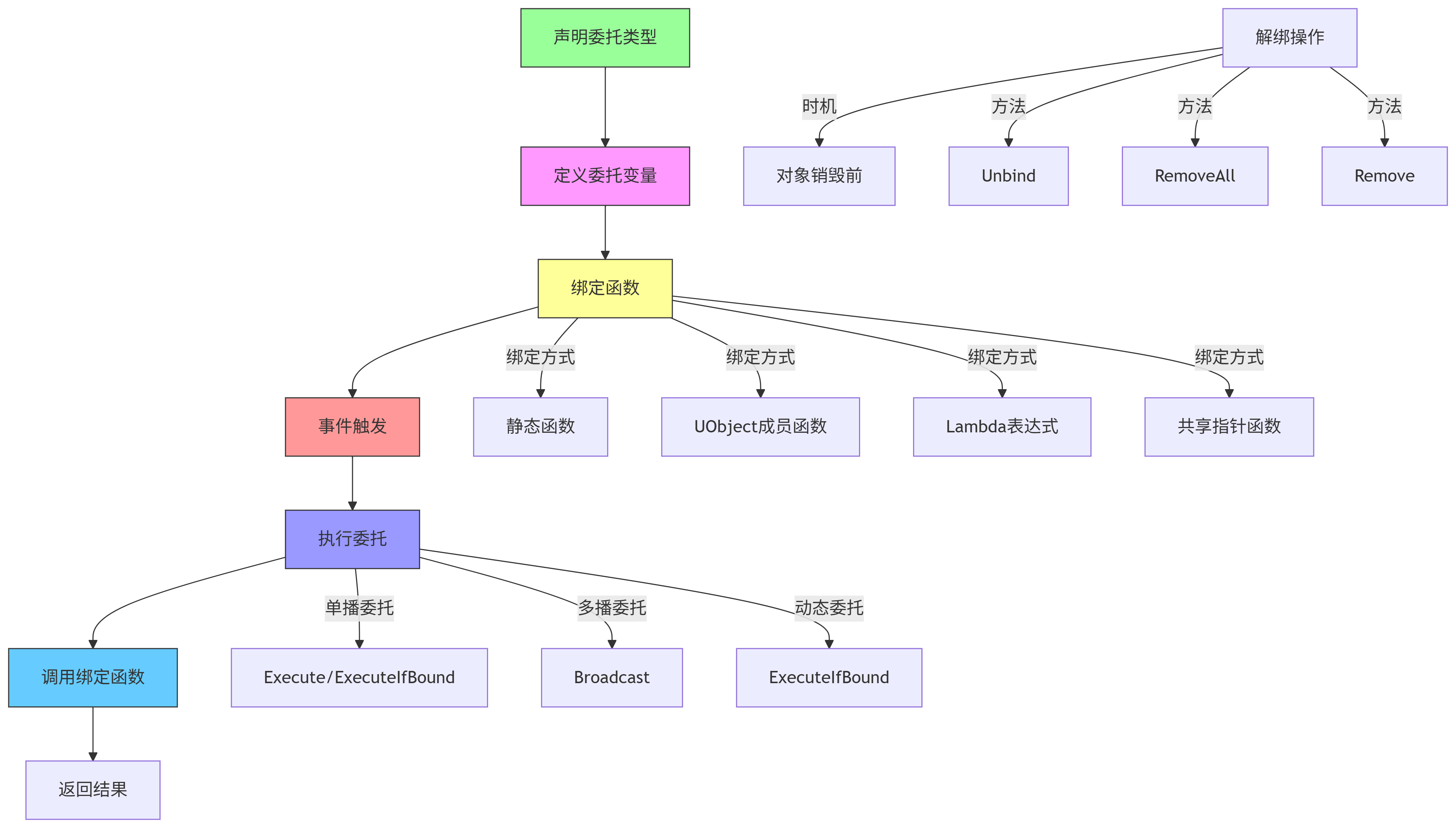
委托本质上是一个函数指针的封装,它可以绑定一个函数,之后在某个时刻调用这个函数。
主要作用是将实时监测的逻辑转换为触发式逻辑,同时降低代码之间的耦合性
常用的委托有单播、多播、动态多播和事件等;
上述委托的概念不在赘述,详细请参考UE官方文档和一文理解透UE委托Delegate以及上面提及的视频连接
委托的使用
由于每种委托的使用方法几乎一样,在此只使用单播作为介绍委托的使用。
委托使用的原理
下图是委托的整个事件类型
下图是使用委托的三个基本类
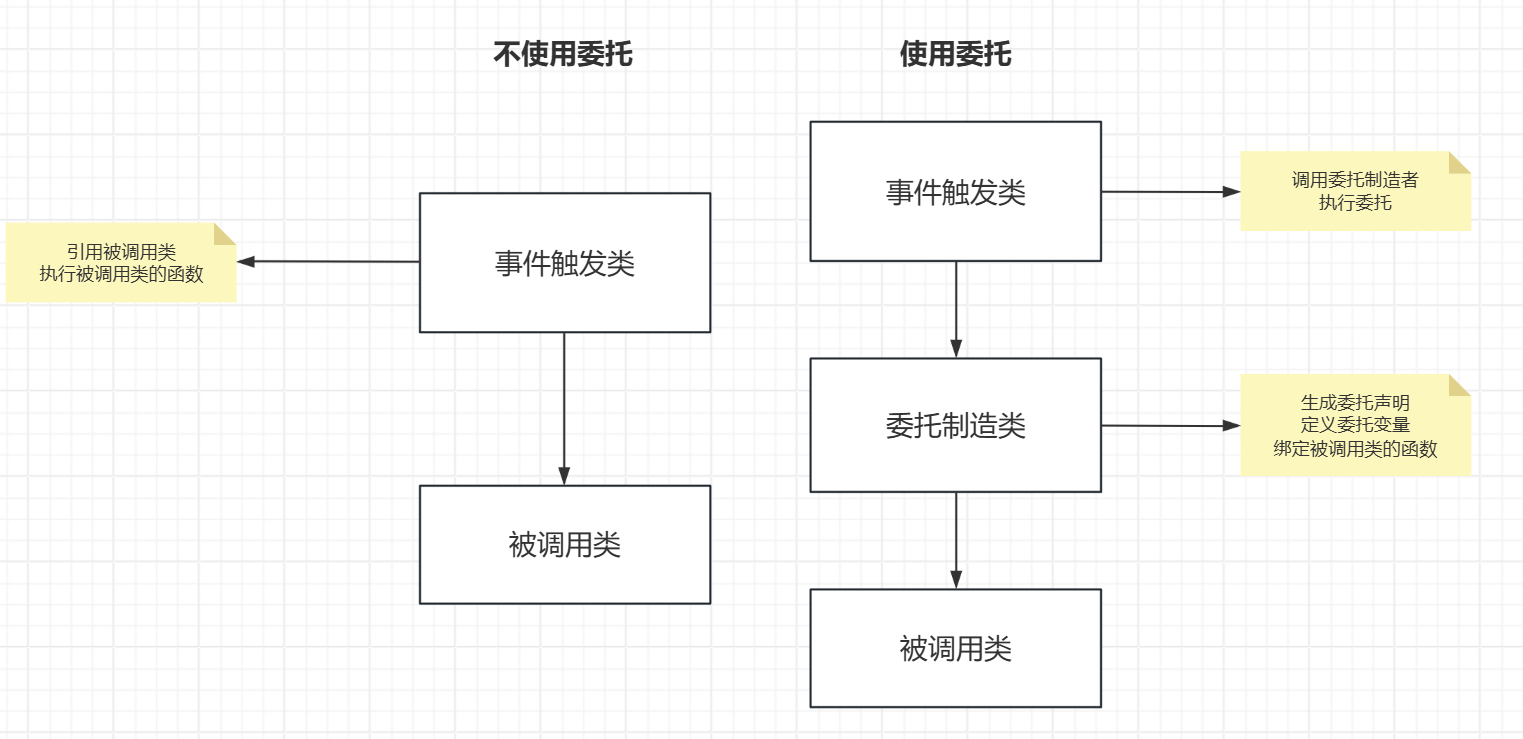
从上图可以看到,使用委托和不使用委托的区别,使用委托可以降低事件触发类和被调用类之间的耦合,将这两个类的操作放在委托制造类里面进行操作,这对于大型项目十分重要。
这里做个比喻就是:你点了一家饭店的吃饭,你要吃的饭汇报给饭店,饭店指定厨师做饭并将饭端给你。这里的你就是事件触发类,饭店就是委托制造类,厨师就是被调用类。
补充
委托的核心类型
根据使用场景的不同,UE 提供了四种主要的委托类型:
| 委托类型 |
描述 |
| 单播委托 (Single-cast) |
只能绑定 1个 函数。执行时有返回值。 |
| 多播委托 (Multi-cast) |
可以绑定 N个 函数。触发时按顺序执行所有函数。没有返回值。 |
| 动态委托 (Dynamic) |
可以在 蓝图 中使用,支持序列化。执行速度稍慢于普通委托。 |
| 事件 (Events) |
类似于多播委托,但只能由声明它的类触发(更安全)。 |
宏命名规则
声明委托时,你需要使用特定的宏。宏的名称直接告诉了你它的功能:
DECLARE_DELEGATE... (单播)DECLARE_MULTICAST_DELEGATE... (多播)DECLARE_DYNAMIC_DELEGATE... (动态单播)DECLARE_DYNAMIC_MULTICAST_DELEGATE... (动态多播)
参数后缀:
- 无后缀:0个参数
_OneParam:1个参数_TwoParams:2个参数(以此类推,最多支持9个)
代码实现
简单代码的实现
声明与定义
假设我们要制作一个“玩家得分”的委托。
1
2
3
4
5
6
7
8
9
10
11
12
13
|
DECLARE_DYNAMIC_MULTICAST_DELEGATE_OneParam(FOnScoreChanged, int32, NewScore);
UCLASS()
class MYGAME_API AMyGameMode : public AGameModeBase
{
GENERATED_BODY()
public:
UPROPERTY(BlueprintAssignable, Category = "Events")
FOnScoreChanged OnScoreChanged;
};
|
绑定 (Binding)
你可以在 C++ 或蓝图中监听这个事件。
1
2
|
MyGameMode->OnScoreChanged.AddDynamic(this, &AMyUserWidget::UpdateScoreDisplay);
|
触发 (Execution)
在 GameMode 中,当分数变化时执行委托:
1
2
3
4
5
6
| void AMyGameMode::AddScore(int32 Amount)
{
CurrentScore += Amount;
OnScoreChanged.Broadcast(CurrentScore);
}
|
UE 委托机制中最核心的特性之一:参数自动传递。
当你执行 OnScoreChanged.Broadcast(CurrentScore) 时,UE 的反射机制会自动将这个 CurrentScore 变量“喂”给所有通过 AddDynamic 绑定了该委托的函数。
这里的代码修改了 UEC++实现人物按照A星路线移动 里面的算法,有需要可以去参考
事件触发类
AStar_test2Character.h
1
2
|
UMyDelegateMaker* Maker;
|
AStar_test2Character.cpp
1
2
3
4
5
6
7
8
9
10
11
12
13
14
15
16
17
18
19
20
21
22
23
24
25
| void AAStar_test2Character::SpineSet()
{
UWorld* World = GetWorld();
if (Maker == nullptr)
{
Maker = NewObject<UMyDelegateMaker>();
}
Maker->BindSpineSet(World).Execute();
}
void AAStar_test2Character::AIMove()
{
UE_LOG(LogTemp, Warning, TEXT("按下3,开始执行AIMOVE"));
UWorld* World = GetWorld();
if (!World) return;
if (Maker == nullptr)
{
Maker = NewObject<UMyDelegateMaker>();
}
Maker->BindAIMove(World).Execute();
}
|
委托制造类(重点)
MyDelegateMaker.h
1
2
3
4
5
6
7
8
9
10
11
12
13
14
15
16
17
18
19
20
21
22
23
24
25
26
27
28
29
30
31
32
33
34
35
|
#pragma once
#include "CoreMinimal.h"
#include "UObject/NoExportTypes.h"
#include "MyDelegateMaker.generated.h"
DECLARE_DELEGATE(FDelegateNoParam)
UCLASS()
class ASTAR_TEST2_API UMyDelegateMaker : public UObject
{
GENERATED_BODY()
public:
FDelegateNoParam Delegate;
FDelegateNoParam Delegate_AIMove;
FDelegateNoParam& BindSpineSet(UWorld* World);
FDelegateNoParam& BindAIMove(UWorld* World);
class ASpine* USpineRef = nullptr;
class AMyAIController* AIControllerRef = nullptr;
};
|
MyDelegateMaker.cpp
1
2
3
4
5
6
7
8
9
10
11
12
13
14
15
16
17
18
19
20
21
22
23
24
25
26
27
28
29
30
31
32
33
34
35
36
37
38
39
40
41
42
43
44
45
46
47
48
49
50
51
52
53
54
55
56
57
58
59
| #include "MyDelegateMaker.h"
#include "EngineUtils.h"
#include "MyAIController.h"
#include "Spine.h"
#include "Kismet/GameplayStatics.h"
FDelegateNoParam& UMyDelegateMaker::BindSpineSet(UWorld* World)
{
if (Delegate.IsBound())
{
Delegate.Unbind();
}
if (USpineRef == nullptr)
{
if(World == nullptr) {
UE_LOG(LogTemp, Error, TEXT("World is nullptr"));
}
else
{
for (TActorIterator<ASpine> It(World); It; ++It)
{
USpineRef = *It;
}
}
}
Delegate.BindUObject(USpineRef, &ASpine::setSpine);
return Delegate;
}
FDelegateNoParam& UMyDelegateMaker::BindAIMove(UWorld* World)
{
if (Delegate.IsBound())
{
Delegate.Unbind();
}
if (AIControllerRef == nullptr)
{
if (World)
{
for (TActorIterator<AMyAIController> It(World); It; ++It)
{
AIControllerRef = *It;
}
Delegate_AIMove.BindUObject(AIControllerRef, &AMyAIController::goAIMove);
}
}
return Delegate_AIMove;
}
|
被调用类
该类中的方法主要是依据A星路线动态生成样条点,可以掠过不看,注意使用方法即可
Spine.h
1
2
3
|
UFUNCTION()
void setSpine() const;
|
Spine.cpp
1
2
3
4
5
6
7
8
9
10
11
12
13
14
15
16
17
18
19
20
21
22
23
24
25
26
|
void ASpine::setSpine() const
{
UWorld* World = GetWorld();
USplineComponent* SplineComp = this -> FindComponentByClass<USplineComponent>();
if (!SplineComp) return;
APlayerController* PlayerController = UGameplayStatics::GetPlayerController(World, 0);
if (!PlayerController) return;
AAStar_test2Character* Character = Cast<AAStar_test2Character>(PlayerController->GetPawn());
if (!Character) return;
TArray<FVector> Vectors = Character->AllPositions;
for (const FVector& Position : Vectors)
{
SplineComp->AddSplinePoint(Position, ESplineCoordinateSpace::World);
}
SplineComp->UpdateSpline();
}
|