代码存放在 GitHub仓库: https://github.com/wuwei1636/java
Mybatis 简介 参考官方文档
MyBatis 是一款优秀的持久层框架
它支持自定义 SQL、存储过程以及高级映射。
MyBatis 免除了几乎所有的 JDBC 代码以及设置参数和获取结果集的工作。
MyBatis 可以通过简单的 XML 或注解来配置和映射原始类型、接口和 Java POJO(Plain Old Java Objects,普通老式 Java 对象)为数据库中的记录。
现在迁移到GitHub中。
如何获取Mybatis
持久化 数据持久化
持久化就是将程序的数据在持久状态和顺势状态转化的过程
内存:断电即失
数据库(jdbc):io文件持久化
持久层 Dao层,Service层,Controller层
第一个Mybatis程序 思路:搭建环境 –> 导入Mybatis –> 编写代码 – > 测试
搭建数据库(MySQL) 1 2 3 4 5 6 7 8 9 10 11 12 13 14 CREATE DATABASE `mybatis`;USE `mybatis`; DROP TABLE IF EXISTS `user `;CREATE TABLE `user ` (`id` int (20 ) NOT NULL PRIMARY KEY, `name` varchar (30 ) DEFAULT NULL , `pwd` varchar (30 ) DEFAULT NULL ) ENGINE= InnoDB DEFAULT CHARSET= utf8; insert into `user `(`id`,`name`,`pwd`) values (1 ,'张三' ,'123456' ),(2 ,'李四' ,'123456' ),(3 ,'王五' ,'123456' );
新建一个项目
新建一个普通的maven项目
删除src目录
导入maven依赖
1 2 3 4 5 6 7 8 9 10 11 12 13 14 15 16 17 18 19 20 21 22 23 <dependencies > <dependency > <groupId > mysql</groupId > <artifactId > mysql-connector-java</artifactId > <version > 5.1.48</version > </dependency > <dependency > <groupId > org.mybatis</groupId > <artifactId > mybatis</artifactId > <version > 3.5.2</version > </dependency > <dependency > <groupId > junit</groupId > <artifactId > junit</artifactId > <version > 4.12</version > <scope > test</scope > </dependency > </dependencies >
创建一个模块
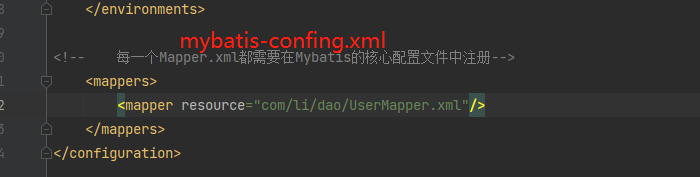
1 2 3 4 5 6 7 8 9 10 11 12 13 14 15 16 17 18 19 20 21 22 23 24 <?xml version="1.0" encoding="UTF-8" ?> <!DOCTYPE configuration PUBLIC "-//mybatis.org//DTD Config 3.0//EN" "http://mybatis.org/dtd/mybatis-3-config.dtd" > <configuration > <environments default ="development" > <environment id ="development" > <transactionManager type ="JDBC" /> <dataSource type ="POOLED" > <property name ="driver" value ="com.mysql.jdbc.Driver" /> <property name ="url" value ="jdbc:mysql://localhost:3306/mybatis?useSSL=false& useUnicode=true& characterEncoding=UTF-8" /> <property name ="username" value ="root" /> <property name ="password" value ="123456" /> </dataSource > </environment > </environments > <mappers > <mapper resource ="com/li/dao/UserMapper.xml" /> </mappers > </configuration >
编写mybatis的工具类(mybatis-confing.xml)
1 2 3 4 5 6 7 8 9 10 11 12 13 14 15 16 17 18 19 20 private static SqlSessionFactory sqlSessionFactory;static { try { String resource = "mybatis-confing.xml" ; InputStream inputStream = Resources.getResourceAsStream(resource); sqlSessionFactory = new SqlSessionFactoryBuilder ().build(inputStream); } catch (IOException e) { throw new RuntimeException (e); } } public static SqlSession getSqlSession () { SqlSession sqlSession = sqlSessionFactory.openSession(); return sqlSession; }
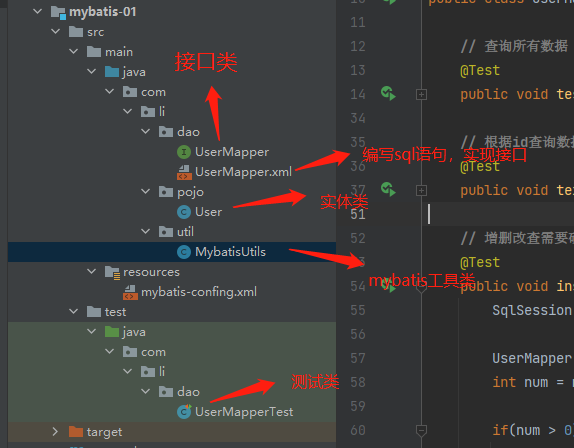
编写代码 实体类 1 2 3 4 5 6 7 8 9 10 11 12 13 14 15 16 17 18 19 20 21 22 23 24 25 26 27 28 29 30 31 32 33 34 35 36 37 38 39 40 41 42 43 44 45 46 47 48 49 50 public class User { private int id; private String name; private String pwd; public User () { } public User (int id, String name, String pwd) { this .id = id; this .name = name; this .pwd = pwd; } public int getId () { return id; } public void setId (int id) { this .id = id; } public String getName () { return name; } public void setName (String name) { this .name = name; } public String getPwd () { return pwd; } public void setPwd (String pwd) { this .pwd = pwd; } @Override public String toString () { return "User{" + "id=" + id + ", name='" + name + '\'' + ", pwd='" + pwd + '\'' + '}' ; } }
dao接口 1 2 3 public interface UserDao { List<User> getUserList () ; }
接口实现类 由原来的UserDaoImpl文件(java)转化为Mapper配置文件(xml)
1 2 3 4 5 6 7 8 9 10 11 12 13 <?xml version="1.0" encoding="UTF-8" ?> <!DOCTYPE mapper PUBLIC "-//mybatis.org//DTD Mapper 3.0//EN" "http://mybatis.org/dtd/mybatis-3-mapper.dtd" > <!--绑定一个Dao/Mapper接口--> <mapper namespace="com.li.dao.UserDao" > <!-- 查询语句--> <select id="getUserList" resultType="com.li.pojo.User" > select * from mybatis.user </select> </mapper>
测试(junit) 注意:要在核心配置文件中注册mapper
测试代码
1 2 3 4 5 6 7 8 9 10 11 12 13 14 15 16 17 18 19 20 21 22 23 24 25 26 27 28 29 30 31 32 33 34 package com.li.dao;import com.li.pojo.User;import com.li.util.MybatisUtils;import org.apache.ibatis.session.SqlSession;import org.junit.Test;import java.util.List;public class UserDaoTest { @Test public void test () { SqlSession sqlSession = MybatisUtils.getSqlSession(); UserDao mapper = sqlSession.getMapper(UserDao.class); List<User> userList = mapper.getUserList(); for (User user : userList){ System.out.println(user); } sqlSession.close(); } }
可能遇到的问题:
配置文件没有注册
绑定接口错误
方法名不对
返回类型不对
maven资源过滤问题
Maven资源过滤问题 解决方法:在pom.xml添加build配置resource
1 2 3 4 5 6 7 8 9 10 11 12 13 14 15 16 17 18 19 20 21 <!--在build中配置resources,来防止我们资源导出失败的问题--> <build> <resources> <resource> <directory>src/main/java</directory> <includes> <include>** *.xml</include> </includes> <filtering>false </filtering> </resource> <resource> <directory>src/main/resources</directory> <includes> <include>** *.xml</include> </includes> <filtering>false </filtering> </resource> </resources> </build>
CRUD namespce namespace中的包名要和Dao/Mapper接口的包名一致
select 选择,查询语句;
1 2 3 id: 就是对应的namespace 中的方法名 resultType : sql 语句的返回值parameterType : c
Insert 接口
1 2 int addUser (User user) ;
编写mapper中的sql语句
1 2 3 4 5 // id 对应前面的接口类的方法 parameterType 是输入的类型,由于下例使用的是实体类,所以直接索引到 com.li.pojo.User <insert id ="addUser" parameterType ="com.li.pojo.User" > insert into mybatis.user (id, name, pwd) values (#{id},#{name},#{pwd}); </insert >
测试
1 2 3 4 5 6 7 8 9 10 11 12 13 14 15 16 @Test public void insert () { SqlSession sqlSession = MybatisUtils.getSqlSession(); UserMapper mapper = sqlSession.getMapper(UserMapper.class); int num = mapper.addUser(new User (4 ,"困困" ,"123456" )); if (num > 0 ){ System.out.println("插入成功" ); } sqlSession.commit(); sqlSession.close(); }
update 和 delete的代码和insert的代码类似,所以直接放所有的代码。
CRUD所有代码 UserMapper.java(接口类) 1 2 3 4 5 6 7 8 9 10 11 12 13 14 15 16 17 18 19 20 21 22 23 24 package com.li.dao;import com.li.pojo.User;import java.util.List;public interface UserMapper { List<User> getUserList () ; User getUserById (int id) ; int addUser (User user) ; int updateUser (User user) ; int deleteUser (int id) ; }
User Mapper.xml(编写sql) 1 2 3 4 5 6 7 8 9 10 11 12 13 14 15 16 17 18 19 20 21 22 23 24 25 26 27 28 29 <?xml version="1.0" encoding="UTF-8" ?> <!DOCTYPE mapper PUBLIC "-//mybatis.org//DTD Mapper 3.0//EN" "http://mybatis.org/dtd/mybatis-3-mapper.dtd" > <mapper namespace ="com.li.dao.UserMapper" > <select id ="getUserList" resultType ="com.li.pojo.User" > select * from mybatis.user </select > <select id ="getUserById" parameterType ="int" resultType ="com.li.pojo.User" > select * from mybatis.user where id = #{id} </select > <insert id ="addUser" parameterType ="com.li.pojo.User" > insert into mybatis.user (id, name, pwd) values (#{id},#{name},#{pwd}); </insert > <update id ="updateUser" parameterType ="com.li.pojo.User" > update mybatis.user set name = #{name},pwd = #{pwd} where id = #{id} ; </update > <delete id ="deleteUser" parameterType ="int" > delete from mybatis.user where id = #{id}; </delete > </mapper >
UserMapperTest(测试) 1 2 3 4 5 6 7 8 9 10 11 12 13 14 15 16 17 18 19 20 21 22 23 24 25 26 27 28 29 30 31 32 33 34 35 36 37 38 39 40 41 42 43 44 45 46 47 48 49 50 51 52 53 54 55 56 57 58 59 60 61 62 63 64 65 66 67 68 69 70 71 72 73 74 75 76 77 78 79 80 81 82 83 84 85 86 87 88 89 90 91 92 93 94 95 96 97 98 99 package com.li.dao;import com.li.pojo.User;import com.li.util.MybatisUtils;import org.apache.ibatis.session.SqlSession;import org.junit.Test;import java.util.List;public class UserMapperTest { @Test public void test () { SqlSession sqlSession = MybatisUtils.getSqlSession(); UserMapper mapper = sqlSession.getMapper(UserMapper.class); List<User> userList = mapper.getUserList(); for (User user : userList){ System.out.println(user); } sqlSession.close(); } @Test public void text () { SqlSession sqlSession = MybatisUtils.getSqlSession(); UserMapper mapper = sqlSession.getMapper(UserMapper.class); User userById = mapper.getUserById(1 ); System.out.println(userById); sqlSession.close(); } @Test public void insert () { SqlSession sqlSession = MybatisUtils.getSqlSession(); UserMapper mapper = sqlSession.getMapper(UserMapper.class); int num = mapper.addUser(new User (4 ,"困困" ,"123456" )); if (num > 0 ){ System.out.println("插入成功" ); } sqlSession.commit(); sqlSession.close(); } @Test public void update () { SqlSession sqlSession = MybatisUtils.getSqlSession(); UserMapper mapper = sqlSession.getMapper(UserMapper.class); int num = mapper.updateUser(new User (1 ,"平安" ,"12345" )); if (num > 0 ){ System.out.println("修改成功" ); } sqlSession.commit(); sqlSession.close(); } @Test public void deleteUser () { SqlSession sqlSession = MybatisUtils.getSqlSession(); UserMapper mapper = sqlSession.getMapper(UserMapper.class); int num = mapper.deleteUser(4 ); if (num > 0 ){ System.out.println("删除成功" ); } sqlSession.commit(); sqlSession.close(); } }
注意
增删改查的时候要提交事务才可以修改数据库中的数据sqlSession.commit();
测试类不在java文件夹中,而在test中
mybatis核心配置文件中配置mapper.xml需要用 / 表示路径
万能的map 1 2 3 4 5 int addUser2 (Map<String,Object> map) ;User getUserById2 (Map<String,Object> map) ;
1 2 3 4 5 6 7 <insert id ="addUser2" parameterType ="map" > insert into mybatis.user (id,name,pwd) values (#{userid},#{username},#{userpwd}); </insert > <select id ="getUserById2" parameterType ="map" resultType ="com.li.pojo.User" > select * from mybatis.user where id = #{userid} and name = #{username}; </select >
1 2 3 4 5 6 7 8 9 10 11 12 13 14 15 16 17 18 19 20 21 22 23 24 25 26 27 28 29 30 31 32 33 34 @Test public void insert2 () { SqlSession sqlSession = MybatisUtils.getSqlSession(); UserMapper mapper = sqlSession.getMapper(UserMapper.class); Map<String, Object> map = new HashMap <>(); map.put("userid" ,5 ); map.put("username" ,"makabaka" ); map.put("userpwd" ,"222333" ); mapper.addUser2(map); sqlSession.commit(); sqlSession.close(); } @Test public void text2 () { SqlSession sqlSession = MybatisUtils.getSqlSession(); UserMapper mapper = sqlSession.getMapper(UserMapper.class); Map<String, Object> map = new HashMap <>(); map.put("userid" ,5 ); map.put("username" ,"makabaka" ); System.out.println(map); User userById2 = mapper.getUserById2(map); System.out.println(userById2); sqlSession.close(); }
map传递参数,直接在sql中取出key即可
对象传递参数,直接在sql中取对象的属性即可
只有一个基本类型参数的情况下,可以直接在sql中取到
多个参数用map,或者注解
模糊查询 在代码执行的过程中传递通配符%
1 List<User> userlist = mapper.getUserLike("%李%" );
在sql拼接中使用通配符
1 2 3 4 5 <select id ="getUserLike" resultType ="com.li.pojo.User" > select * from mybatis.user where name like "%"#{value}"%"; // 会报错 ,下面两种均可以 select * from ssmbuild.books where bookName like '%${bookName}%'; select * from ssmbuild.books where bookName like concat('%',#{bookName},'%'); </select >
配置解析 核心配置 mybatis-config.xml MyBatis 的配置文件包含了会深深影响 MyBatis 行为的设置和属性信息。
1 2 3 4 5 6 7 8 9 10 11 12 13 configuration(配置) properties(属性) settings(设置) typeAliases(类型别名) typeHandlers(类型处理器) objectFactory(对象工厂) plugins(插件) environments(环境配置) environment(环境变量) transactionManager(事务管理器) dataSource(数据源) databaseIdProvider(数据库厂商标识) mappers(映射器)
环境配置(environments) 学会配置使用多套运行环境
Mybatis默认的事务管理器就是JDBC,连接池:POOLED
属性(properties) 通过properties属性来实现引用配置文件
这些属性可以在外部进行配置,并可以进行动态替换。你既可以在典型的 Java 属性文件中配置这些属性,也可以在 properties 元素的子元素中设置。【db.properties】
编写一个配置文件 db.properties
1 2 3 4 driver =com.mysql.jdbc.Driver url =jdbc:mysql://localhost:3306/mybatis?useSSL=false&useUnicode=true&characterEncoding=UTF-8 username =root password =123456
在核心配置文件中映入
1 <properties resource ="db.properties" />
可以直接引入外部文件
可以在其中增加一些属性配置
如果两个文件有同一个字段,优先使用外部配置文件
类型别名(typeAliases) 类型别名可为 Java 类型设置一个缩写名字。 它仅用于 XML 配置,意在降低冗余的全限定类名书写。
1 2 3 4 <typeAliases > <typeAlias type ="com.li.pojo.User" alias ="User" > </typeAlias > </typeAliases >
也可以指定一个包名,Mybatis会在包名下搜索Java Bean,比如
扫描实体类的包,他的默认名就为这个类的 类名,首字母小写
1 2 3 4 <typeAliases > <package name ="com.li.pojo" /> </typeAliases >
在实体类比较少的时候,使用第一种。
如果实体类比较多,建议使用第二种。
第一种使用可以diy,第二种不可以。如果非要改,需要在实体类中添加注解
1 2 @Alias("user") public class user {}
设置(settings) 这是 MyBatis 中极为重要的调整设置,它们会改变 MyBatis 的运行时行为。
其他配置
映射器(Mapper) MapperRegistry:注册绑定我们的Mapper文件
方式一:**(推荐使用)**
1 2 3 4 <mappers > <mapper resource ="com/li/dao/UserMapper.xml" /> </mappers >
方式二:使用clas文件绑定注册
1 2 3 4 <mappers > <mapper class ="com.li.dao.UserMapper" /> </mappers >
注意点:
接口和它的Mapper配置文件必须同名
接口和他的Mapper配置文件必须在同一个包下
方式三:使用扫描包进行注册绑定
1 2 3 4 <mappers > <package name ="com.li.dao" /> </mappers >
注意点:
接口和它的Mapper配置文件必须同名
接口和他的Mapper配置文件必须在同一个包下
resultMap 结果集映射
1 2 3 4 5 6 7 8 9 10 11 <resultMap id ="UserMap" type ="User" > <id column ="id" property ="id" /> <result column ="name" property ="name" /> <result column ="pwd" property ="password" /> </resultMap > <select id ="selectUserById" resultMap ="UserMap" > select * from user where id = #{id} </select >
mybatis还没有学完,由于部分原因,直接开始spring的学习,日后有时间会补上mybatis
spring 1 2 3 4 5 6 7 8 9 10 11 12 13 14 15 16 17 <?xml version="1.0" encoding="UTF-8" ?> <beans xmlns ="http://www.springframework.org/schema/beans" xmlns:xsi ="http://www.w3.org/2001/XMLSchema-instance" xsi:schemaLocation ="http://www.springframework.org/schema/beans https://www.springframework.org/schema/beans/spring-beans.xsd" > <bean id ="petStore" class ="org.springframework.samples.jpetstore.services.PetStoreServiceImpl" > <property name ="accountDao" ref ="accountDao" /> <property name ="itemDao" ref ="itemDao" /> </bean > </beans >
测试
1 2 3 4 5 6 7 8 9 10 11 12 13 import com.li.pojo.User;import org.springframework.context.ApplicationContext;import org.springframework.context.support.ClassPathXmlApplicationContext;public class MyTest { public static void main (String[] args) { ApplicationContext context = new ClassPathXmlApplicationContext ("beans.xml" ); User user1 = (User) context.getBean("u1" ); user1.show(); } }
使用IOC创建对象的方式 使用无参构造创建对象,默认
假设我们要使用有参构造创建对象
下标赋值
1 2 3 4 5 <bean id ="user" class ="com.li.pojo.User" > <constructor-arg index ="0" value ="likun" /> </bean >
通过类型创建
1 2 3 4 <bean id ="user" class ="com.li.pojo.User" > <constructor-arg type ="java.lang.String" value ="123465346" /> </bean >
通过参数名
1 2 3 <bean id ="user" class ="com.li.pojo.User" > <constructor-arg name ="name" value ="123" /> </bean >
总结:在配置文件加载的过程中,容器中的对象就已经初始化了
spring配置 别名 1 2 // 如果添加了别名,也可以使用别名来访问 (beans.xml中配置别名) <alias name ="user" alias ="usernew" />
bean的配置 1 2 3 4 5 6 7 8 <bean id ="user" class ="com.li.pojo.User" name ="user2,u1" > <constructor-arg name ="name" value ="123" /> </bean >
import 一般用于团队开发,他可以将多个配置文件,导入合并为一个
假设,现在项目中有多个人开发,三个人分别开发不同的类,不同的类需要注册在不同的bean中,我们可以利用import,将所有人的beans.xml合并为一个总的
使用的时候,直接使用总的配置即可(applicationContext.xml)
内容相同也会被合并
DI依赖注入 构造器注入 前面有,有参构造
set方式注入(重点)
依赖注入: set注入
依赖:bean对象的创建依赖于容器
注入:bean对象中的所有属性,由容器来注入
【环境搭建】
复杂类型 1 2 3 4 5 6 7 8 9 10 11 public class Address { private String address; public String getAddress () { return address; } public void setAddress (String address) { this .address = address; } }
真实测试对象 1 2 3 4 5 6 7 8 9 10 11 12 13 14 15 16 17 18 19 20 21 22 23 24 25 26 27 28 29 30 31 32 33 34 35 36 37 38 39 40 41 42 43 44 45 46 47 48 49 50 51 52 53 54 55 56 57 58 59 60 61 62 63 64 65 66 67 68 69 70 71 72 73 74 75 76 77 78 79 80 81 82 83 84 85 86 87 88 public class Student { private String name; private Address address; private String[] books; private List<String> hobbys; private Map<String,String> card; private Set<String> games; private String wife; private Properties info; public String getName () { return name; } public void setName (String name) { this .name = name; } public Address getAddress () { return address; } public void setAddress (Address address) { this .address = address; } public String[] getBooks() { return books; } public void setBooks (String[] books) { this .books = books; } public List<String> getHobbys () { return hobbys; } public void setHobbys (List<String> hobbys) { this .hobbys = hobbys; } public Map<String, String> getCard () { return card; } public void setCard (Map<String, String> card) { this .card = card; } public Set<String> getGames () { return games; } public void setGames (Set<String> games) { this .games = games; } public String getWife () { return wife; } public void setWife (String wife) { this .wife = wife; } public Properties getInfo () { return info; } public void setInfo (Properties info) { this .info = info; } @Override public String toString () { return "Student{" + "name='" + name + '\'' + ", address=" + address + ", books=" + Arrays.toString(books) + ", hobbys=" + hobbys + ", card=" + card + ", games=" + games + ", wife='" + wife + '\'' + ", info=" + info + '}' ; } }
beans.xml 1 2 3 4 5 6 7 8 9 10 11 12 <?xml version="1.0" encoding="UTF-8" ?> <beans xmlns ="http://www.springframework.org/schema/beans" xmlns:xsi ="http://www.w3.org/2001/XMLSchema-instance" xsi:schemaLocation ="http://www.springframework.org/schema/beans https://www.springframework.org/schema/beans/spring-beans.xsd" > <bean id ="studeng" class ="com.li.pojo.Student" > <property name ="name" value ="李坤松" /> </bean > </beans >
测试类 1 2 3 4 5 6 7 8 9 10 11 12 13 14 import com.li.pojo.Student;import org.springframework.context.ApplicationContext;import org.springframework.context.support.ClassPathXmlApplicationContext;public class MyTest { public static void main (String[] args) { ApplicationContext context = new ClassPathXmlApplicationContext ("beans.xml" ); Student studdent = (Student) context.getBean("studeng" ); System.out.println(studdent.getName()); } }
完善注入信息 1 2 3 4 5 6 7 8 9 10 11 12 13 14 15 16 17 18 19 20 21 22 23 24 25 26 27 28 29 30 31 32 33 34 35 36 37 38 39 40 41 42 43 44 45 46 47 48 49 50 51 52 53 54 55 56 57 58 59 60 61 62 63 64 65 66 67 <?xml version="1.0" encoding="UTF-8" ?> <beans xmlns ="http://www.springframework.org/schema/beans" xmlns:xsi ="http://www.w3.org/2001/XMLSchema-instance" xsi:schemaLocation ="http://www.springframework.org/schema/beans https://www.springframework.org/schema/beans/spring-beans.xsd" > <bean id ="address" class ="com.li.pojo.Address" > <property name ="address" value ="河南省郑州市登封市" /> </bean > <bean id ="studeng" class ="com.li.pojo.Student" > <property name ="name" value ="李坤松" /> <property name ="address" ref ="address" /> <property name ="books" > <array > <value > 红楼梦</value > <value > 西游记</value > <value > 水浒传</value > <value > 三国演义</value > </array > </property > <property name ="hobbys" > <list > <value > 听歌</value > <value > 看电影</value > </list > </property > <property name ="card" > <map > <entry key ="身份证" value ="123456" /> <entry key ="银行卡" value ="123fasdf" /> </map > </property > <property name ="games" > <set > <value > LOL</value > <value > COC</value > </set > </property > <property name ="wife" > <null /> </property > <property name ="info" > <props > <prop key ="学号" > 123123123</prop > <prop key ="姓名" > 李坤松</prop > </props > </property > </bean > </beans >
拓展方式注入 我们可以使用p命名空间和c命名空间注入
1 2 3 4 5 6 7 8 9 10 11 12 13 14 15 <?xml version="1.0" encoding="UTF-8" ?> <beans xmlns ="http://www.springframework.org/schema/beans" xmlns:xsi ="http://www.w3.org/2001/XMLSchema-instance" xmlns:p ="http://www.springframework.org/schema/p" xmlns:c ="http://www.springframework.org/schema/c" xsi:schemaLocation ="http://www.springframework.org/schema/beans https://www.springframework.org/schema/beans/spring-beans.xsd" > <bean id ="user" class ="com.li.pojo.User" p:name ="李坤松" p:age ="19" /> <bean id ="user2" class ="com.li.pojo.User" c:age ="19" c:name ="李坤松" /> </beans >
测试
1 2 3 4 5 6 @Test public void test2 () { ApplicationContext context = new ClassPathXmlApplicationContext ("userbeans.xml" ); User user = (User) context.getBean("user2" ); System.out.println(user); }
注意:p命名和c命名空间不能直接使用,需要导入xml约束
1 2 xmlns:p="http://www.springframework.org/schema/p" xmlns:c="http://www.springframework.org/schema/c"
Bean的作用域
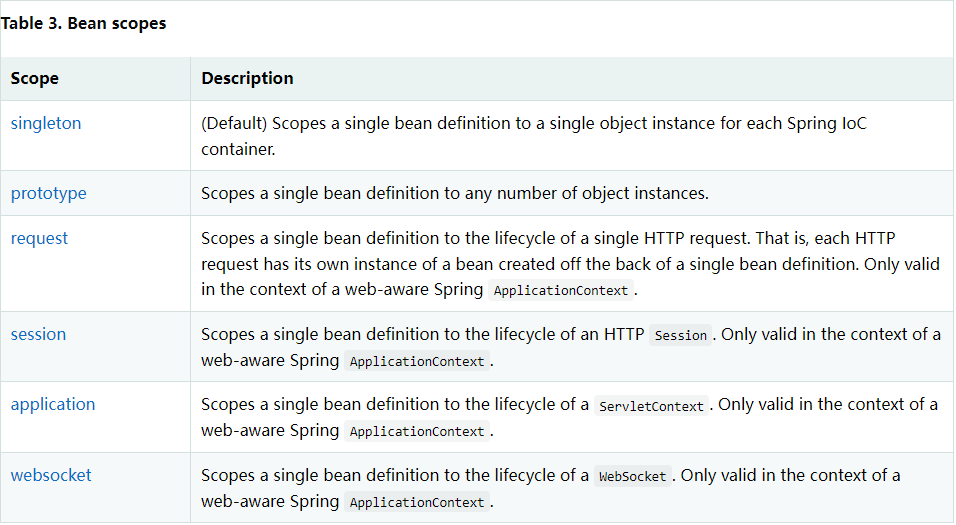
1.单例模式(spring默认机制)
1 <bean id="user" class="com.li.pojo.User" p:name="李坤松" p:age="19" scope="singleton" />
2.原型模式: 每次从容器中get的时候,都会产生一个新对象
1 <bean id="accountService" class="com.something.DefaultAccountService" scope="prototype" />
3.其余的request,session,application,这些只能在web开发中使用
Bean的自动装配
自动装配是Spring满足bean依赖的一种方式
Spring会在上下文中自动寻找,并自动给bean装配属性
在Spring中有三种装配方式
在xml中显示的配置
在java中显示的配置
隐式的自动装配bean(重要)
测试 环境搭建:一个人有两个宠物
自动装配 1 2 3 4 5 6 7 8 9 10 <bean id ="people" class ="com.li.pojo.People" autowire ="byName" > <property name ="name" value ="likunsong" /> </bean > <bean id ="people" class ="com.li.pojo.People" autowire ="byType" > <property name ="name" value ="likunsong" /> </bean >
总结:
byname的时候,要保证所有bean的id唯一,并且这个bean需要和自动注入的属性set方法一致
byname的时候,要保证所有bean的class唯一,并且这个bean需要和自动注入的属性的类型一致
使用注解自动装配 jdk1.5,Spring2.5支持注解
使用注解须知:
导入约束
配置注解的支持
1 2 3 4 5 6 7 8 9 10 11 12 <?xml version="1.0" encoding="UTF-8" ?> <beans xmlns ="http://www.springframework.org/schema/beans" xmlns:xsi ="http://www.w3.org/2001/XMLSchema-instance" xmlns:context ="http://www.springframework.org/schema/context" xsi:schemaLocation ="http://www.springframework.org/schema/beans https://www.springframework.org/schema/beans/spring-beans.xsd http://www.springframework.org/schema/context https://www.springframework.org/schema/context/spring-context.xsd" > <context:annotation-config /> </beans >
@Autowired
直接在属性上使用! 也可以在set方式上使用
使用Autowired 我么你可以不用编写set方法,前提是自动装配的属性在IOC(Spring)容器中存在,且符合名字byName
科普:
1 @Nullable 字段标记了这个注解,说明这个字段可以为null
如果@Autowired自动装配的环境比较复杂,自动装配无法通过一个注解 @Autowired完成的时候,我们可以使用 @Qulifier(value = “xxx”) 去配置 @Autowired 的使用,指定一个唯一的bean对象注入
1 2 3 4 5 6 7 8 public class people { @Autowired @Qualifier(value = "cat") private Cat cat; @Autowired @Qualifier(value = "dog") private Dog dog; }
@resource
1 2 3 4 5 6 public class people { @Resource(value = "cat") private Cat cat; @Resource(value = "dog") private Dog dog; }
小结:
@Resource 和 @Autowired 的区别
都是用来自动装配的额,都可以放在属性字段上
@Autowired 通过byType的方式实现,而且必须要求这个对象存在
@Resource 默认通过byname的方式实现,如果找不到名字,则通过byType实现,两个都找不到的情况下,就报错
执行顺序不同: @Autowired 通过byType的方式实现 @Resource 默认通过byname的方式实现
使用注解开发 Spring4 之后,必须要导入aop的包
使用注解需要导入context的约束
1 2 3 4 5 6 7 8 9 10 11 12 <?xml version="1.0" encoding="UTF-8" ?> <beans xmlns ="http://www.springframework.org/schema/beans" xmlns:xsi ="http://www.w3.org/2001/XMLSchema-instance" xmlns:context ="http://www.springframework.org/schema/context" xsi:schemaLocation ="http://www.springframework.org/schema/beans https://www.springframework.org/schema/beans/spring-beans.xsd http://www.springframework.org/schema/context https://www.springframework.org/schema/context/spring-context.xsd" > <context:annotation-config /> </beans >
1.bean
1 @Component :组件,放在类上,说明这个类被Spring管理了,就是bean
2.属性如何注入
1 2 3 4 5 @Component public class User { @Value("likun") public String name ; }
3.衍生的注解
@component 有几个衍生注解,我们在web开发中,会按照mvc三层架构分层
dao 【@Repository】
service 【@Service】
controller 【@Controller】
这四个注解功能都是一样的,都是代表将某个类注册到Spring中,装配bean
4.自动装配
上面有,自行翻找
5.作用域
1 2 3 4 5 6 7 8 9 10 11 @Component @Scope("singleton") public class User { public String name ; @Value("likun") public void setName (String name) { this .name = name; } }
6.小结
xml与注解:
xml更加万能,适用于任何场合!维护简单方便
注解 不是自己的类不能使用,维护相对复杂
最佳实践:
xml用来管理bean
注解只负责完成属性的注入
我们在使用的过程中,只需要注意一个问题,要想使注解生效,就需要开启注解支持
1 2 3 <context:component-scan base-package ="com.li" /> <context:annotation-config />
完全使用java的方式配置Srping 我们现在要完全不适用spring的xml配置,全权交给java
javaConfig是Spring的一个子项目,在Spring 4 之后,他成为了一个核心功能
实体类
1 2 3 4 5 6 7 8 9 10 11 12 13 14 15 16 17 18 19 20 @Component public class User { private String name; public String getName () { return name; } @Value("nihao") public void setName (String name) { this .name = name; } @Override public String toString () { return "User{" + "name='" + name + '\'' + '}' ; } }
配置文件类
1 2 3 4 5 6 7 8 9 10 11 12 13 14 15 16 @Configuration @ComponentScan("com.li.pojo") @Import(config2.class) public class myconfig { @Bean public User getUser () { return new User (); } }
测试类
1 2 3 4 5 6 7 8 public class Mytest { public static void main (String[] args) { ApplicationContext context = new AnnotationConfigApplicationContext (myconfig.class); User getUser = (User) context.getBean("getUser" ); System.out.println(getUser.getName()); } }
纯java配置的方式,在SpringBoot中随处可见
代理模式 代理模式分类:
静态代理
抽象的角色:一般会使用接口或者抽象类来解决
真实角色:被代理的角色
代理角色:代理真实角色,代理真实角色后,我们会做一些附属操作
客户: 访问代理对象的人
代码步骤:
1.接口
1 2 3 4 5 public interface Rent { public void rent () ; }
2.真实角色
1 2 3 4 5 6 7 8 public class Host implements Rent { @Override public void rent () { System.out.println("房东要出租房子" ); } }
3.代理角色
1 2 3 4 5 6 7 8 9 10 11 12 13 14 15 16 17 18 19 20 21 22 23 24 25 26 27 28 29 30 31 32 public class proxy implements Rent { private Host host; public proxy () { } public proxy (Host host) { this .host = host; } @Override public void rent () { seeHouse(); host.rent(); hetong(); fare(); } public void seeHouse () { System.out.println("中介看房" ); } public void hetong () { System.out.println("签合同" ); } public void fare () { System.out.println("收中介费" ); } }
4.客户端访问角色
1 2 3 4 5 6 7 8 9 10 11 public class Client { public static void main (String[] args) { Host host = new Host (); proxy proxy = new proxy (host); proxy.rent(); } }
代理模式的好处:
可以使真实角色的操作更加纯粹,不用去关注一些公共的业务
公共业务就交给代理角色,实现了业务的分工
公共业务在发生扩展的时候,方便集中管理
缺点:
一个真实角色就会产生一个代理角色,代码量会翻倍,开发效率变低
理解
接口
1 2 3 4 5 6 public interface UserServide { public void add () ; public void delete () ; public void update () ; public void query () ; }
实现类
1 2 3 4 5 6 7 8 9 10 11 12 13 14 15 16 17 18 19 20 21 22 public class UserServiceImpl implements UserServide { @Override public void add () { System.out.println("增加了一个用户" ); } @Override public void delete () { System.out.println("删除了一个用户" ); } @Override public void update () { System.out.println("修改了一个用户" ); } @Override public void query () { System.out.println("查询了一个用户" ); } }
代理
1 2 3 4 5 6 7 8 9 10 11 12 13 14 15 16 17 18 19 20 21 22 23 24 25 26 27 28 29 30 31 32 33 34 35 36 37 public class UserServiceProxy implements UserServide { private UserServiceImpl userService; public void setUserService (UserServiceImpl userService) { this .userService = userService; } @Override public void add () { log("add" ); userService.add(); } @Override public void delete () { log("delete" ); userService.delete(); } @Override public void update () { log("update" ); userService.update(); } @Override public void query () { log("query" ); userService.query(); } public void log (String masg) { System.out.println("使用了" +masg + "方法" ); } }
使用
1 2 3 4 5 6 7 8 9 public class Client { public static void main (String[] args) { UserServiceImpl userService = new UserServiceImpl (); UserServiceProxy proxy = new UserServiceProxy (); proxy.setUserService(userService); proxy.add(); } }
动态代理
动态代理和静态代理角色一样
动态代理的代理类是动态生成的,不是我们直接写好的
动态代理分为两大类:基于接口的动态代理,基于类的动态代理
基于接口 – JDK动态代理
基于类: cglib
java字节码实现: javassist
需要了解两个类:Proxy 代理, InvocationHandler 调用处理程序
动态代理的好处:
可以使真实角色的操作更加纯粹,不用去关注一些公共的业务
公共业务就交给代理角色,实现了业务的分工
公共业务在发生扩展的时候,方便集中管理
一个动态代理类代理的是一个接口,一般对应的就是一类业务
一个动态代理类可以代理多个类,只要是实现了同一个接口就行
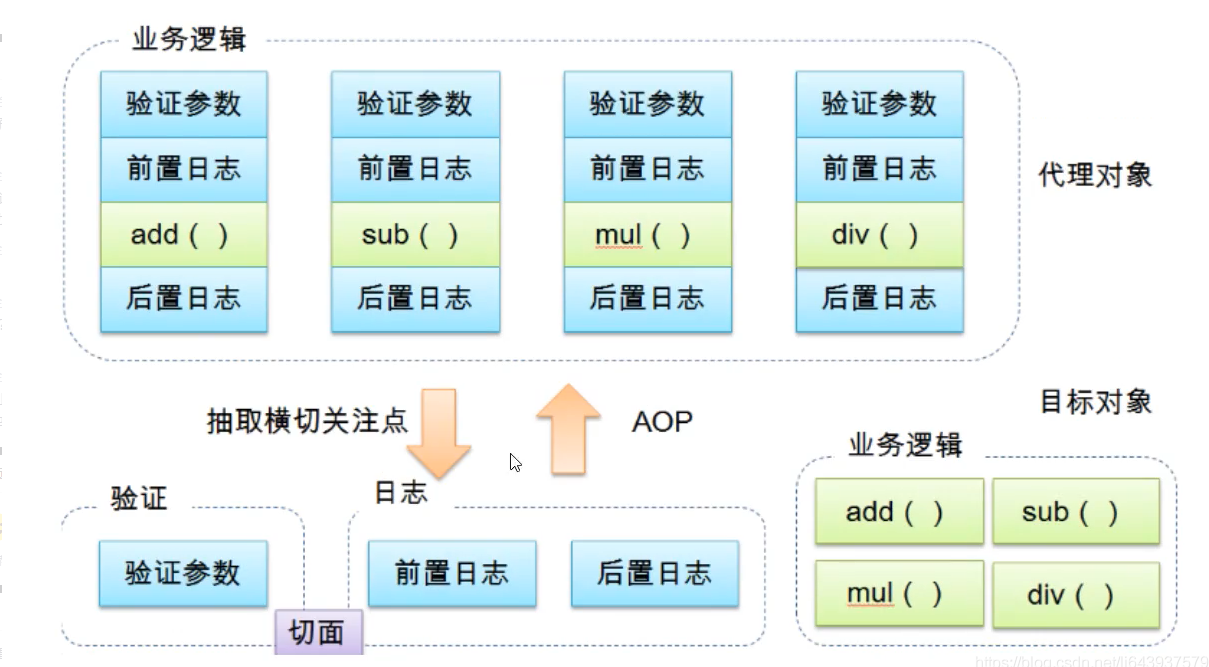
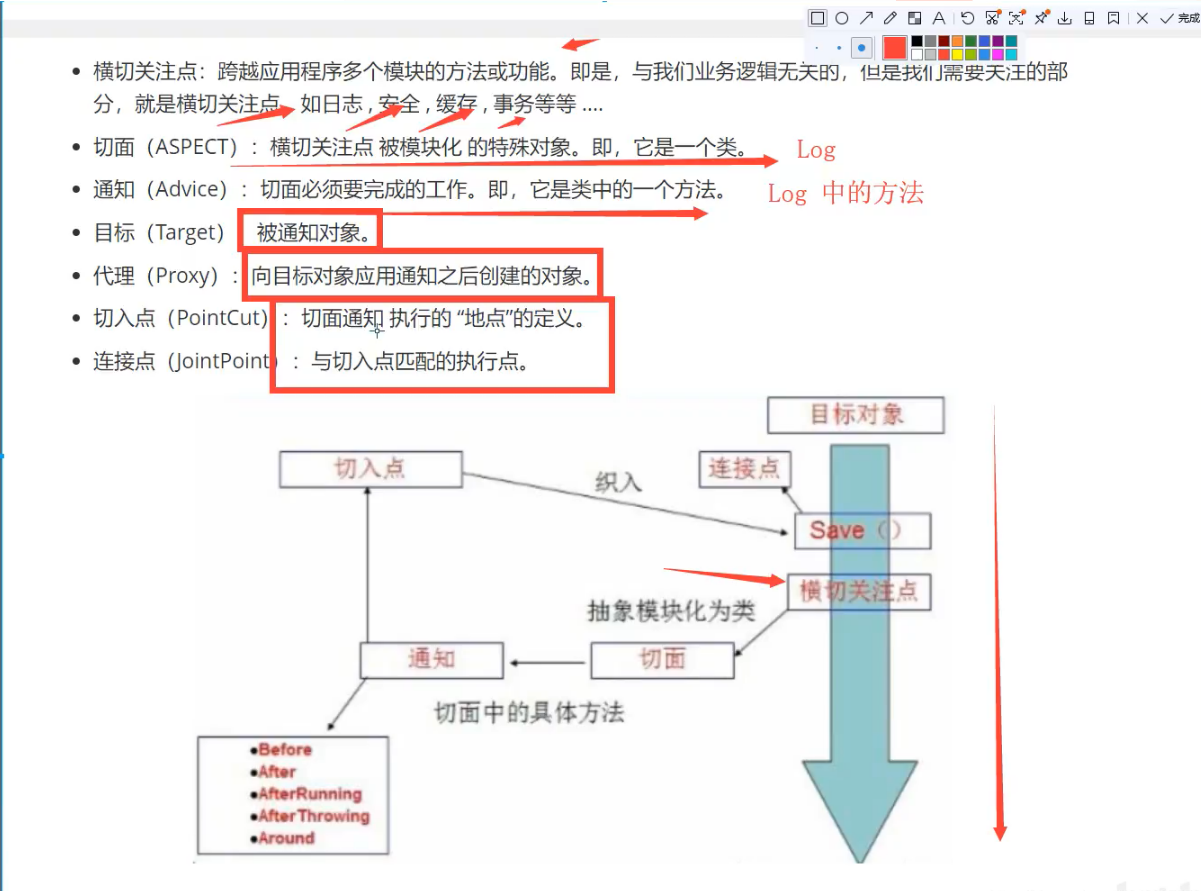
AOP 什么是AOP AOP(Aspect Oriented Programming)意为:面向切面编程,通过预编译方式和运行期动态代理实现程序功能的统一维护的一种技术。AOP是OOP的延续,是软件开发中的一个热点,也是Spring框架中的一个重要内容,是函数式编程的一种衍生范型。利用AOP可以对业务逻辑的各个部分进行隔离,从而使得业务逻辑各部分之间的耦合度降低,提高程序的可重用性,同时提高了开发的效率。
AOP在Spring中的作用 提供声明式事务;允许用户自定义切面
横切关注点:跨越应用程序多个模块的方法或功能。即是,与我们业务逻辑无关的,但是我们需要关注的部分,就是横切关注点。如日志,安全,缓存,事务等等…
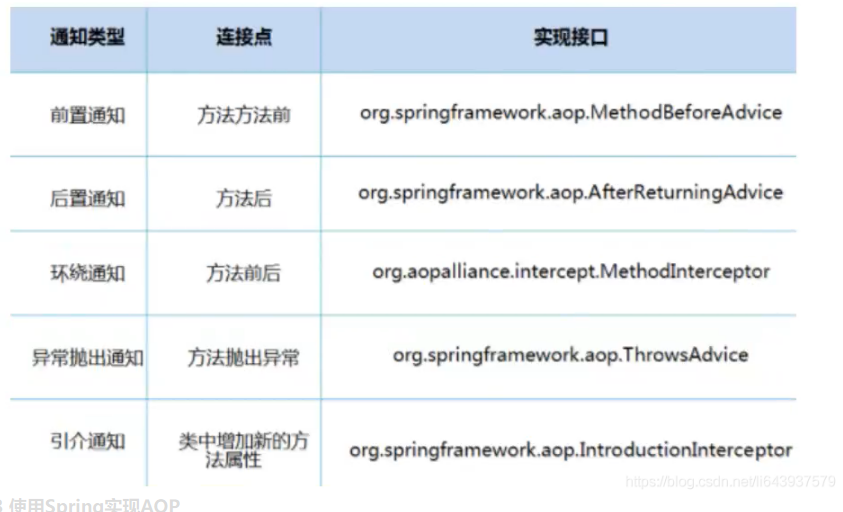
SpringAOP中,通过Advice定义横切逻辑,Spring中支持5种类型的Advice:
即AOP在不改变原有代码的情况下,去增加新的功能。
AOP的使用 在applicationContest.xml中加入aop的约束
1 2 3 4 5 6 7 8 9 10 11 <?xml version="1.0" encoding="UTF-8" ?> <beans xmlns ="http://www.springframework.org/schema/beans" xmlns:xsi ="http://www.w3.org/2001/XMLSchema-instance" xmlns:aop ="http://www.springframework.org/schema/aop" xsi:schemaLocation ="http://www.springframework.org/schema/beans https://www.springframework.org/schema/beans/spring-beans.xsd http://www.springframework.org/schema/aop https://www.springframework.org/schema/aop/spring-aop.xsd" ></beans >
在pom.xml中添加依赖
1 2 3 4 5 6 7 <dependencies > <dependency > <groupId > org.aspectj</groupId > <artifactId > aspectjweaver</artifactId > <version > 1.9.4</version > </dependency > </dependencies >
方式一: 使用Spring实现API接口【主要是spring api接口实现】
applicationContest 配置文件
1 2 3 4 5 6 7 8 9 10 11 12 13 14 15 16 17 18 19 20 21 22 23 24 25 26 27 <?xml version="1.0" encoding="UTF-8" ?> <beans xmlns ="http://www.springframework.org/schema/beans" xmlns:xsi ="http://www.w3.org/2001/XMLSchema-instance" xmlns:aop ="http://www.springframework.org/schema/aop" xsi:schemaLocation ="http://www.springframework.org/schema/beans https://www.springframework.org/schema/beans/spring-beans.xsd http://www.springframework.org/schema/aop https://www.springframework.org/schema/aop/spring-aop.xsd" > <bean id ="userService" class ="com.li.service.UserServiceImpl" /> <bean id ="log" class ="com.li.log.log" /> <bean id ="afterlog" class ="com.li.log.Afterlog" /> <aop:config > <aop:pointcut id ="pointcut" expression ="execution(* com.li.service.UserServiceImpl.*(..))" /> <aop:advisor advice-ref ="log" pointcut-ref ="pointcut" /> <aop:advisor advice-ref ="afterlog" pointcut-ref ="pointcut" /> </aop:config > </beans >
log AfterLog
1 2 3 4 5 6 7 public class Afterlog implements AfterReturningAdvice { @Override public void afterReturning (Object returnValue, Method method, Object[] args, Object target) throws Throwable { System.out.println("执行了" +method.getName()+"返回结果为" +returnValue); } }
log beforelog
1 2 3 4 5 6 7 8 9 10 11 12 13 public class log implements MethodBeforeAdvice { @Override public void before (Method method, Object[] args, Object target) throws Throwable { System.out.println(target.getClass().getName()+"的" +method.getName()+"被执行了" ); } }
接口
1 2 3 4 5 6 7 8 9 package com.li.service;public interface UserService { public void add () ; public void delete () ; public void update () ; public void query () ; }
接口实现类
1 2 3 4 5 6 7 8 9 10 11 12 13 14 15 16 17 18 19 20 21 22 23 24 package com.li.service;public class UserServiceImpl implements UserService { @Override public void add () { System.out.println("增加了一个用户" ); } @Override public void delete () { System.out.println("删除了一个用户" ); } @Override public void update () { System.out.println("修改了一个用户" ); } @Override public void query () { System.out.println("查询了一个用户" ); } }
方式二: 自定义来实现AOP【主要是切面定义】
1 2 3 4 5 6 7 8 9 10 11 12 13 14 15 16 17 18 19 20 21 22 23 24 25 26 27 28 29 30 <?xml version="1.0" encoding="UTF-8" ?> <beans xmlns ="http://www.springframework.org/schema/beans" xmlns:xsi ="http://www.w3.org/2001/XMLSchema-instance" xmlns:aop ="http://www.springframework.org/schema/aop" xsi:schemaLocation ="http://www.springframework.org/schema/beans https://www.springframework.org/schema/beans/spring-beans.xsd http://www.springframework.org/schema/aop https://www.springframework.org/schema/aop/spring-aop.xsd" > <bean id ="userService" class ="com.li.service.UserServiceImpl" /> <bean id ="log" class ="com.li.log.log" /> <bean id ="afterlog" class ="com.li.log.Afterlog" /> <bean id ="diycut" class ="com.li.diy.DiyPointCut" /> <aop:config > <aop:aspect ref ="diycut" > <aop:pointcut id ="point" expression ="execution(* com.li.service.UserServiceImpl.*(..))" /> <aop:before method ="before" pointcut-ref ="point" /> <aop:after method ="after" pointcut-ref ="point" /> </aop:aspect > </aop:config > </beans >
diy类
1 2 3 4 5 6 7 8 9 public class DiyPointCut { public void before () { System.out.println("======方法执行前======" ); } public void after () { System.out.println("=======方法执行后=======" ); } }
接口和接口实现类并无改变
方式三: 使用注解实现
1 2 3 4 5 6 7 8 9 10 11 12 13 14 15 16 17 18 19 20 21 22 23 24 25 26 27 28 29 30 31 32 33 34 35 36 37 38 39 package com.li.diy;import org.aspectj.lang.ProceedingJoinPoint;import org.aspectj.lang.Signature;import org.aspectj.lang.annotation.After;import org.aspectj.lang.annotation.Around;import org.aspectj.lang.annotation.Aspect;import org.aspectj.lang.annotation.Before;@Aspect public class AnnotataionPointCut { @Before("execution(* com.li.service.UserServiceImpl.*(..))") public void before () { System.out.println("方法执行前" ); } @After("execution(* com.li.service.UserServiceImpl.*(..))") public void after () { System.out.println("方法执行后" ); } @Around("execution(* com.li.service.UserServiceImpl.*(..))") public void around (ProceedingJoinPoint jp) throws Throwable { System.out.println("方法环绕" ); Signature signature = jp.getSignature(); System.out.println("签名" + signature); Object proceed = jp.proceed(); System.out.println("环绕后" ); } }
1 2 3 4 5 6 7 8 9 10 11 12 13 14 15 16 17 18 19 20 21 22 <?xml version="1.0" encoding="UTF-8" ?> <beans xmlns ="http://www.springframework.org/schema/beans" xmlns:xsi ="http://www.w3.org/2001/XMLSchema-instance" xmlns:aop ="http://www.springframework.org/schema/aop" xsi:schemaLocation ="http://www.springframework.org/schema/beans https://www.springframework.org/schema/beans/spring-beans.xsd http://www.springframework.org/schema/aop https://www.springframework.org/schema/aop/spring-aop.xsd" > <bean id ="userService" class ="com.li.service.UserServiceImpl" /> <bean id ="log" class ="com.li.log.log" /> <bean id ="afterlog" class ="com.li.log.Afterlog" /> <bean id ="AnnotataionPointCut" class ="com.li.diy.AnnotataionPointCut" /> <aop:aspectj-autoproxy /> </beans >
整合MyBatis 步骤:
导入相关jar包
junit
mybatis
mysql数据库
spring相关的
aop植入
mybatis-spring
1 2 3 4 5 6 7 8 9 10 11 12 13 14 15 16 17 18 19 20 21 22 23 24 25 26 27 28 29 30 31 32 33 34 35 36 37 38 39 40 41 42 43 44 45 46 47 48 49 50 51 52 53 54 55 56 57 58 59 60 61 62 63 64 65 66 67 68 69 70 71 72 <dependencies > <dependency > <groupId > junit</groupId > <artifactId > junit</artifactId > <version > 4.12</version > <scope > test</scope > </dependency > <dependency > <groupId > mysql</groupId > <artifactId > mysql-connector-java</artifactId > <version > 5.1.48</version > </dependency > <dependency > <groupId > org.mybatis</groupId > <artifactId > mybatis</artifactId > <version > 3.5.2</version > </dependency > <dependency > <groupId > org.springframework</groupId > <artifactId > spring-webmvc</artifactId > <version > 5.3.20</version > </dependency > <dependency > <groupId > org.springframework</groupId > <artifactId > spring-jdbc</artifactId > <version > 5.3.20</version > </dependency > <dependency > <groupId > org.aspectj</groupId > <artifactId > aspectjweaver</artifactId > <version > 1.9.9.1</version > </dependency > <dependency > <groupId > org.mybatis</groupId > <artifactId > mybatis-spring</artifactId > <version > 2.0.7</version > </dependency > <dependency > <groupId > org.projectlombok</groupId > <artifactId > lombok</artifactId > <version > 1.18.24</version > </dependency > </dependencies > <build > <resources > <resource > <directory > src/main/java</directory > <includes > <include > **/*.properties</include > <include > **/*.xml</include > </includes > <filtering > false</filtering > </resource > <resource > <directory > src/main/resources</directory > <includes > <include > **/*.properties</include > <include > **/*.xml</include > </includes > <filtering > false</filtering > </resource > </resources > </build >
编写配置文件
测试
回忆mybatis
编写实体类
1 2 3 4 5 6 7 8 import lombok.Data;@Data public class User { private int id; private String name; private String pwd; }
编写核心配置文件
1 2 3 4 5 6 7 8 9 10 11 12 13 14 15 16 17 18 19 20 21 22 23 24 25 26 27 <?xml version="1.0" encoding="UTF-8" ?> <!DOCTYPE configuration PUBLIC "-//mybatis.org//DTD Config 3.0//EN" "http://mybatis.org/dtd/mybatis-3-config.dtd" > <configuration > <typeAliases > <package name ="com.li.pojo" /> </typeAliases > <environments default ="development" > <environment id ="development" > <transactionManager type ="JDBC" /> <dataSource type ="POOLED" > <property name ="driver" value ="com.mysql.jdbc.Driver" /> <property name ="url" value ="jdbc:mysql://localhost:3306/mybatis?useSSL=false& useUnicode=true& characterEncoding=UTF-8" /> <property name ="username" value ="root" /> <property name ="password" value ="123456" /> </dataSource > </environment > </environments > <mappers > <mapper resource ="com/li/mapper/UserMapper.xml" /> </mappers > </configuration >
编写接口
1 2 3 4 5 6 7 import com.li.pojo.User;import java.util.List;public interface UserMapper { public List<User> seleectuser () ; }
编写mapper.xml
<?xml version="1.0" encoding="UTF-8" ?>
<!DOCTYPE mapper
PUBLIC "-//mybatis.org//DTD Mapper 3.0//EN"
"http://mybatis.org/dtd/mybatis-3-mapper.dtd">
<!--绑定一个Dao/Mapper接口-->
<mapper namespace="com.li.mapper.UserMapper">
<!-- 查询语句-->
<select id="seleectuser" resultType="user">
select * from mybatis.user
</select>
</mapper>
1 2 3 4 5 6 7 8 9 10 11 12 13 14 15 16 17 18 19 20 21 22 23 24 25 26 27 28 29 30 31 32 33 34 35 36 6. 测试 ```java import com.li.mapper.UserMapper; import com.li.pojo.User; import org.apache.ibatis.io.Resources; import org.apache.ibatis.session.SqlSession; import org.apache.ibatis.session.SqlSessionFactory; import org.apache.ibatis.session.SqlSessionFactoryBuilder; import org.junit.Test; import java.io.IOException; import java.io.InputStream; import java.util.List; public class Mtest { @Test public void test () throws IOException { String resources = "mybatis-config.xml" ; InputStream in = Resources.getResourceAsStream(resources); SqlSessionFactory build = new SqlSessionFactoryBuilder ().build(in); SqlSession sqlSession = build.openSession(true ); UserMapper mapper = sqlSession.getMapper(UserMapper.class); List<User> seleectuser = mapper.seleectuser(); for (User user : seleectuser){ System.out.println(user); } } }
MyBatis-Spring 方式一: 实现类(User)
1 2 3 4 5 6 7 8 import lombok.Data;@Data public class User { private int id; private String name; private String pwd; }
接口类(UserMapper)
1 2 3 4 5 6 import com.li.pojo.User;import java.util.List;public interface UserMapper { public List<User> seleectuser () ; }
实现接口,编写sql语句
1 2 3 4 5 6 7 8 9 10 11 12 13 <?xml version="1.0" encoding="UTF-8" ?> <!DOCTYPE mapper PUBLIC "-//mybatis.org//DTD Mapper 3.0//EN" "http://mybatis.org/dtd/mybatis-3-mapper.dtd" > <mapper namespace ="com.li.mapper.UserMapper" > <select id ="seleectuser" resultType ="user" > select * from mybatis.user </select > </mapper >
UserMapperImpl
1 2 3 4 5 6 7 8 9 10 11 12 13 14 15 16 17 18 19 20 import com.li.pojo.User;import org.mybatis.spring.SqlSessionTemplate;import java.util.List;public class UserMapperImpl implements UserMapper { private SqlSessionTemplate sqlSessionTemplate; public void setSqlSessionTemplate (SqlSessionTemplate sqlSessionTemplate) { this .sqlSessionTemplate = sqlSessionTemplate; } @Override public List<User> seleectuser () { UserMapper mapper = sqlSessionTemplate.getMapper(UserMapper.class); return mapper.seleectuser(); } }
resource配置文件
applicationContext.xml 注册bean
1 2 3 4 5 6 7 8 9 10 11 12 13 14 15 16 17 18 19 20 21 <?xml version="1.0" encoding="UTF-8" ?> <beans xmlns ="http://www.springframework.org/schema/beans" xmlns:xsi ="http://www.w3.org/2001/XMLSchema-instance" xmlns:aop ="http://www.springframework.org/schema/aop" xsi:schemaLocation ="http://www.springframework.org/schema/beans https://www.springframework.org/schema/beans/spring-beans.xsd http://www.springframework.org/schema/aop https://www.springframework.org/schema/aop/spring-aop.xsd" > <import resource ="spring-dao.xml" /> <bean id ="userMapper" class ="com.li.mapper.UserMapperImpl" > <property name ="sqlSessionTemplate" ref ="sqlSession" /> </bean > <bean id ="useMapper2" class ="com.li.mapper.UserMapperImpl2" > <property name ="sqlSessionFactory" ref ="sqlSessionFactory" /> </bean > </beans >
mybatis-config.xml
1 2 3 4 5 6 7 8 9 10 11 12 <?xml version="1.0" encoding="UTF-8" ?> <!DOCTYPE configuration PUBLIC "-//mybatis.org//DTD Config 3.0//EN" "http://mybatis.org/dtd/mybatis-3-config.dtd" > <configuration > <typeAliases > <package name ="com.li.pojo" /> </typeAliases > </configuration >
spring-dao.xml
1 2 3 4 5 6 7 8 9 10 11 12 13 14 15 16 17 18 19 20 21 22 23 24 25 26 27 28 29 30 31 32 33 34 <?xml version="1.0" encoding="UTF-8" ?> <beans xmlns ="http://www.springframework.org/schema/beans" xmlns:xsi ="http://www.w3.org/2001/XMLSchema-instance" xmlns:aop ="http://www.springframework.org/schema/aop" xsi:schemaLocation ="http://www.springframework.org/schema/beans https://www.springframework.org/schema/beans/spring-beans.xsd http://www.springframework.org/schema/aop https://www.springframework.org/schema/aop/spring-aop.xsd" > <bean id ="dataSource" class ="org.springframework.jdbc.datasource.DriverManagerDataSource" > <property name ="driverClassName" value ="com.mysql.jdbc.Driver" /> <property name ="url" value ="jdbc:mysql://localhost:3306/mybatis?useSSL=false& useUnicode=true& characterEncoding=UTF-8" /> <property name ="username" value ="root" /> <property name ="password" value ="123456" /> </bean > <bean id = "sqlSessionFactory" class = "org.mybatis.spring.SqlSessionFactoryBean" > <property name = "dataSource" ref = "dataSource" /> <property name ="configLocation" value ="classpath:mybatis-config.xml" /> <property name ="mapperLocations" value ="classpath:com/li/mapper/*.xml" /> </bean > <bean id ="sqlSession" class ="org.mybatis.spring.SqlSessionTemplate" > <constructor-arg index ="0" ref ="sqlSessionFactory" /> </bean > </beans >
测试
1 2 3 4 5 6 7 8 9 10 11 12 13 14 15 16 17 18 19 20 21 22 23 24 25 26 27 import com.li.mapper.UserMapper;import com.li.mapper.UserMapperImpl;import com.li.pojo.User;import org.apache.ibatis.io.Resources;import org.apache.ibatis.session.SqlSession;import org.apache.ibatis.session.SqlSessionFactory;import org.apache.ibatis.session.SqlSessionFactoryBuilder;import org.junit.Test;import org.springframework.context.ApplicationContext;import org.springframework.context.support.ClassPathXmlApplicationContext;import java.io.IOException;import java.io.InputStream;import java.util.List;public class Mtest { @Test public void test () throws IOException { ApplicationContext context = new ClassPathXmlApplicationContext ("applicationContext.xml" ); UserMapper userMapper = (UserMapper) context.getBean("userMapper" ); for (User user : userMapper.seleectuser()){ System.out.println(user); } } }
方式二 修改UserMapperImpl 为 UserMapperImpl2 使用 SqlSessionDaoSupport
1 2 3 4 5 6 7 8 9 10 11 12 13 import com.li.pojo.User;import org.apache.ibatis.session.SqlSession;import org.mybatis.spring.support.SqlSessionDaoSupport;import java.util.List;public class UserMapperImpl2 extends SqlSessionDaoSupport implements UserMapper { @Override public List<User> seleectuser () { return getSqlSession().getMapper(UserMapper.class).seleectuser(); } }
声明式事务 事物的ACID原则:
原子性
一致性
隔离性
持久性
事务一旦提交,无论系统发生什么问题,结果都不会被影响,被持久化写到存储器中
spring中的事务管理
声明式事务 : AOP
编程式事务 : 需要在代码中进行事务的管理
spring配置声明式事务
如果我们不在spring中配置声明式事务,我们就需要在代码中手动配置事务
配置事务
修改接口类(UserMapper)
1 2 3 4 5 6 7 8 9 10 import com.li.pojo.User;import java.util.List;public interface UserMapper { public List<User> selectUser () ; public int addUser (User user) ; public int del (int id) ; }
编写sql语句(UserMapper.xml)
1 2 3 4 5 6 7 8 9 10 11 12 13 14 15 16 17 18 19 20 21 <?xml version="1.0" encoding="UTF-8" ?> <!DOCTYPE mapper PUBLIC "-//mybatis.org//DTD Mapper 3.0//EN" "http://mybatis.org/dtd/mybatis-3-mapper.dtd" > <mapper namespace ="com.li.mapper.UserMapper" > <select id ="selectUser" resultType ="user" > select * from mybatis.user </select > <insert id ="addUser" parameterType ="user" > insert into mybatis.user (id,name,pwd) values (#{id},#{name},#{pwd}); </insert > <delete id ="del" parameterType ="int" > delete from mybatis.user where id = #{id}; </delete > </mapper >
实现方法(UserMapperImpl)
1 2 3 4 5 6 7 8 9 10 11 12 13 14 15 16 17 18 19 20 21 22 23 24 25 26 27 28 29 30 31 import com.li.pojo.User;import org.mybatis.spring.SqlSessionTemplate;import org.mybatis.spring.support.SqlSessionDaoSupport;import java.util.List;public class UserMapperImpl extends SqlSessionDaoSupport implements UserMapper { @Override public List<User> selectUser () { User user = new User (6 , "小王" , "123324" ); UserMapper mapper = getSqlSession().getMapper(UserMapper.class); mapper.addUser(user); mapper.del(6 ); return mapper.selectUser(); } @Override public int addUser (User user) { return getSqlSession().getMapper(UserMapper.class).addUser(user); } @Override public int del (int id) { return getSqlSession().getMapper(UserMapper.class).del(id); } }
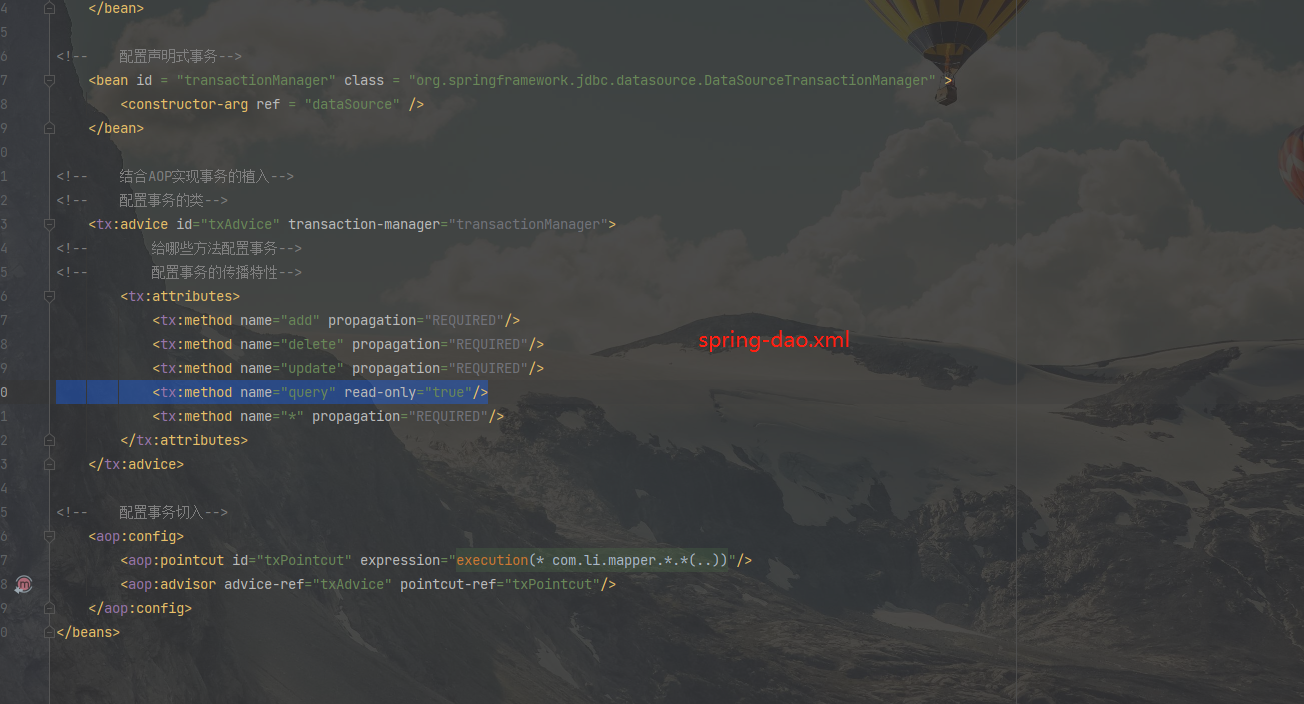
修改spring-dao.xml 添加了事务的处理
1 2 3 4 5 6 7 8 9 10 11 12 13 14 15 16 17 18 19 20 21 22 23 24 25 26 27 28 29 30 31 32 33 34 35 36 37 38 39 40 41 42 43 44 45 46 47 48 49 50 51 52 53 54 55 56 57 58 59 60 61 62 <?xml version="1.0" encoding="UTF-8" ?> <beans xmlns ="http://www.springframework.org/schema/beans" xmlns:xsi ="http://www.w3.org/2001/XMLSchema-instance" xmlns:aop ="http://www.springframework.org/schema/aop" xmlns:tx ="http://www.springframework.org/schema/tx" xsi:schemaLocation ="http://www.springframework.org/schema/beans https://www.springframework.org/schema/beans/spring-beans.xsd http://www.springframework.org/schema/aop https://www.springframework.org/schema/aop/spring-aop.xsd http://www.springframework.org/schema/tx https://www.springframework.org/schema/tx/spring-tx.xsd" > <bean id ="dataSource" class ="org.springframework.jdbc.datasource.DriverManagerDataSource" > <property name ="driverClassName" value ="com.mysql.jdbc.Driver" /> <property name ="url" value ="jdbc:mysql://localhost:3306/mybatis?useSSL=false& useUnicode=true& characterEncoding=UTF-8" /> <property name ="username" value ="root" /> <property name ="password" value ="123456" /> </bean > <bean id = "sqlSessionFactory" class = "org.mybatis.spring.SqlSessionFactoryBean" > <property name = "dataSource" ref = "dataSource" /> <property name ="configLocation" value ="classpath:mybatis-config.xml" /> <property name ="mapperLocations" value ="classpath:com/li/mapper/*.xml" /> </bean > <bean id ="sqlSession" class ="org.mybatis.spring.SqlSessionTemplate" > <constructor-arg index ="0" ref ="sqlSessionFactory" /> </bean > <bean id = "transactionManager" class = "org.springframework.jdbc.datasource.DataSourceTransactionManager" > <constructor-arg ref = "dataSource" /> </bean > <tx:advice id ="txAdvice" transaction-manager ="transactionManager" > <tx:attributes > <tx:method name ="add" propagation ="REQUIRED" /> <tx:method name ="delete" propagation ="REQUIRED" /> <tx:method name ="update" propagation ="REQUIRED" /> <tx:method name ="query" read-only ="true" /> <tx:method name ="*" propagation ="REQUIRED" /> </tx:attributes > </tx:advice > <aop:config > <aop:pointcut id ="txPointcut" expression ="execution(* com.li.mapper.*.*(..))" /> <aop:advisor advice-ref ="txAdvice" pointcut-ref ="txPointcut" /> </aop:config > </beans >